Top 5 Projects for Beginners Making Apps with AI Coding


If you're new to using AI or new to coding, you don't need to start with something complicated. The best apps are the ones that feel fun, intuitive, and instantly satisfying. It's super possible today to build things in an afternoon and show to your friends without having to understand a bunch of technical concepts to make it work. The best advice I can give is to just make something that works, and that you find fun.
Here's another piece of advice to keep creation stress-free: don't overwhelm yourself by adding a ton of unnecessary features. Focus on making the program feel good to use instead of stuffing it with features. Creating software that feels good teaches you how to make things people like. After all, we want people to enjoy our creations, right?
Let's get into five easy project ideas that will help you learn the basics while actually having fun.
Table of Contents
5. An AI Episode or Story Generator for your Favorite Show
If you're into a TV show, an anime, a game fandom, or another fictional universe, you can spin up a tiny generator that creates new episodes or short stories on demand.
Tools like this are super shareable if you're the type of person who wants to grow a community or fanbase. People love running "what if" scenarios for their fandoms. Websim's foundations allow you to create these tools and instantly share them. Our Remixing feature means that anyone can continue a project from where someone else started, meaning an entire community can iterate upon a single project and make it something incredible together.
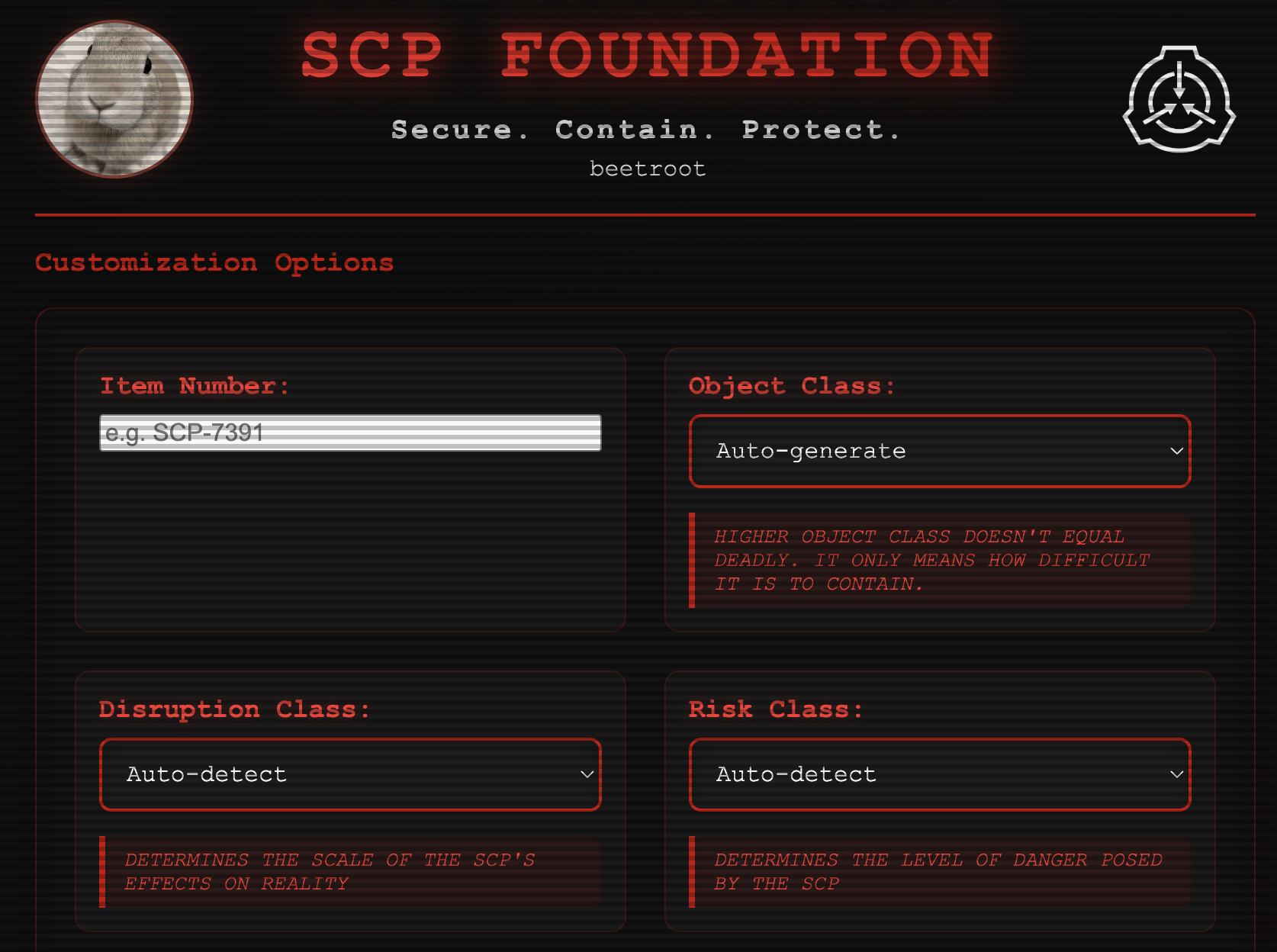
SCP Article Generator by @dll creates articles for fans of the collaborative online creative writing project known as the SCP Foundation. Secure, Contain, Protect!
The Prompt:
It's as easy as typing "make me a story generator using AI". If you want to be more specific, you can add in what you want the stories to be about, add in some writing styles, story length buttons or anything else you can think of to customize your generated stories. You could even tell it to add in AI-generated images based on what happens in the story.
4. A Simple AI Image Generator
A lightweight image generator (now using the FLUX.2 Klein model!) teaches you how prompts work when generating images in addition to code, how to get different outputs from the same page through style and prompt changes, and how to display outputs on a page. Style changes can be handled through clickable buttons that alter your image generation AI's system prompt.
How about using the AI's binary brain to generate digital glitch art? If you prefer more realistic art styles, then you could create renaissance paintings or even I-Spy style images with hidden easter eggs to find.
Creating an AI image generator is a simple, fun, beginner-friendly way to experiment with UI tweaks, prompt templates, and custom styles.
Italian Brainrot Generator by @maxbittker
The Prompt:
This one can be as short as "make an AI image generator". If you want to go above and beyond in making an awesome image generator, specify that you want to be able to choose styles, or select aspect ratio so you can make vertical or horizontal images. You can even tell it to "make a program that lets users upload an image for the AI to 'see' and generate something based on that image".
3. A Small Artistic Toy
You can create procedural shapes, generative art, moving patterns, weird shaders, or combine these into a single art piece. Learn more and check out some of the examples from our AI Creative Coding blog post here to see more AI creative coding art.
Art toys are perfect starter projects because you can mix a little code, a little AI, a little random number noise, and get something that feels creative even if you're still learning the basics.
The Prompt:
Art toys can also be super simple or complex. Start by trying the prompt "make a beautiful geometric shader" and see what the AI spits out. Tell the AI what would make the project look cooler or prettier, and see where it takes you!
2. An AI Chatroom with Your Favorite Characters
Creating something that lets you talk to your favorite characters and even let them talk to each other sounds impossible. But it's actually really simple now! All you're doing is setting up a chat interface like a messaging app, group chat, or even a simulated email inbox and giving the AI a personality prompt, also known as a system prompt. This informs the AI of how it's supposed to respond. When you describe the character you want the AI to take on the personality of, you're helping write its system prompt.
These kinds of projects make for great social projects because you can invite friends in, add multiple characters, or turn it into a tiny roleplay engine from your favorite fictional world.
The Prompt:
Simply tell Websim to 'Create a chatroom with AI characters' and for more personalization detail, you can tell it who the characters are and how they might act.
1. A Windows XP (or Any Fake Operating System) Simulator
This is the perfect first "big" project. A mock operating system teaches you UI layout, buttons, windows, simple states, and basic logic. Add AI and it becomes even cooler: a help assistant, fake apps powered by prompts, or a desktop that reacts to the user.
An operating system simulator is an intuitive environment for viewers to engage with multiple pieces of media in one place. Importing videos or images is as easy as uploading them, and for games and creative code you can take the code or the address bar URL of any Websim project and tell the AI to add it to your desktop with its own unique button.
People love these simulators. They're nostalgic, fun to customize, and ridiculously addictive to play with.
A Windows XP Simulation built entirely on Websim by @bookwormkevin
The Prompt:
Try asking your Websim project to 'create a windows 98 style operating system', or you could even ask for an operating system that has never existed. Continue the project by adding in simulated "applications" on the desktop.
Start Building Your First AI Project Today
The best way to learn AI coding is to jump in and start creating. Each of these projects teaches you fundamental concepts while letting you build something genuinely fun and shareable. Whether you're crafting stories for your favorite fandom, generating unique images, building interactive art toys, chatting with AI characters, or creating nostalgic operating systems, you're learning real skills that will help you build more complex projects in the future.
Remember: focus on making something that works and feels good to use. Don't worry about adding every possible feature right away. Start simple, iterate, and have fun with the process.
Start creating your first AI project on Websim and join a community of creators who are building the future of interactive experiences.